Video sharpener: make a soft video clearer, free in your browser
A free AI video sharpener that runs in your browser. It rebuilds whiskers, lashes and lettering in soft footage, where a sharpen slider only makes the edges you can already see harder.
- Free in your browser: no upload, no watermark, no signup, any length.
- On a phone, Fast mode is free on the device. AI enhance runs in the cloud at 1 credit per second, packs from $5.
Free · never uploaded · any length
Sharpen slider or AI sharpener
Both are called sharpening. They do different things to a soft frame.
- Sharpen slider
- The sharpen control in phone and desktop editors raises the contrast along edges that are already there. Outlines look a little harder, and detail that is blurred stays blurred.
- AI enhance
- The model draws the fine lines the frame lost: whiskers, eyelashes, hair and small text come back as separate strokes.
- In our test
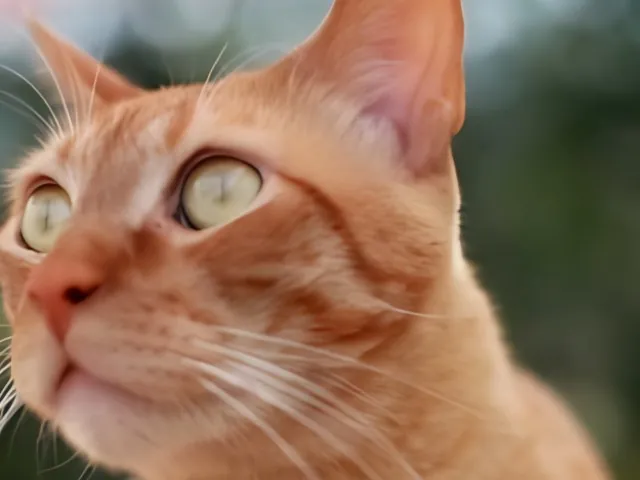
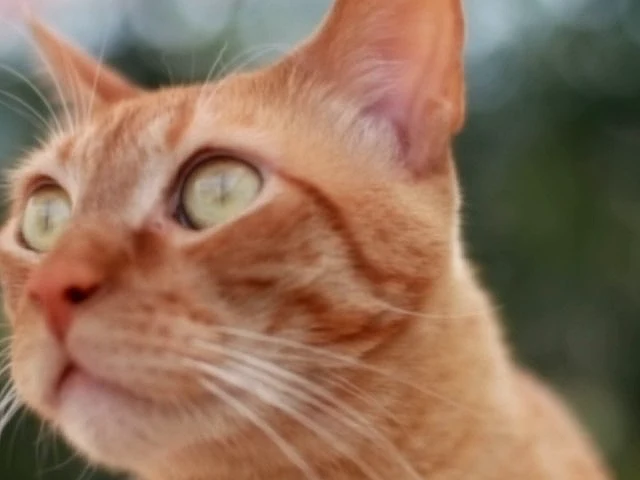
- On the same mildly out of focus frame, the sharpen filter left the cat's whiskers as one soft blur; AI enhance brought them back one by one.
The sample above is our own comparison, 19 Nov 2026. We took a frame from a free stock clip of a cat, scaled down and lightly blurred on purpose. On the left a standard sharpen filter (ffmpeg unsharp at 5 × 5, amount 1.5, the kind of setting a sharpen slider applies), on the right ToHD's AI enhance on the same frame.
Footage the sharpener clears
Pause your video on a frame and look at the fine lines.
- Slightly out of focusThe camera focused just behind your subject. Eyes, hair and outlines come back crisp.
- Soft from a small file360p and 480p clips look smeared on a laptop or TV. The sharpener cleans them up while it enlarges them to 720p or 1080p.
- Fuzzy text and signsLettering on signs, shirts and screens gets clean edges you can read.
How to sharpen a video
- Drop the original clip Use the file from your phone or camera. Copies saved from chat apps have already lost detail.
- Keep AI enhance on AI enhance is the setting that rebuilds detail. On a computer it runs free in your browser, for any length.
- Compare three frames first The tool sharpens three frames from across your clip, shows them next to the original and tells you how long the whole clip will take.
- Save the MP4 The sharpened video is saved from your browser. Nothing is uploaded.
Sharpen a video on iPhone or Android
- Free on the phone
- Fast mode runs on the phone itself and sharpens lightly. In real runs from 12 to 19 Nov 2026 it took a median of about 1 minute for a 30 second clip at 1080p on an iPhone, and about 3.4 minutes on Android phones.
- AI enhance in the cloud
- For the full AI sharpening on a phone, the cloud runs it at 1 credit per second for 1080p, from a $5 pack. You see the credits before anything uploads.
- On a computer
- AI enhance runs free in Chrome or Edge on your own graphics card, with no upload and no length limit.
Other fixes
Video sharpener questions
Is the video sharpener free?
Yes. On a computer, AI enhance runs free in your browser with no signup, no watermark and no length limit. On a phone, Fast mode is free on the device, and AI enhance runs in the cloud at 1 credit per second from a $5 pack.
How is this different from the sharpen slider in my video editor?
A sharpen slider adds contrast along edges that are already visible. AI enhance redraws the fine detail a soft frame lost, so whiskers, lashes and small text come back as separate lines.
Can it make a blurry video clear?
It clears soft and slightly out of focus footage and small, smeared clips. Eyes, hair, outlines and lettering come back with clean edges.
Is my video uploaded?
Not with the free tool. The video is read, sharpened and saved inside your browser tab. Only the cloud option uploads it, after you choose it and see the credits.
Which files work?
MP4, MOV and WebM files from iPhone, Android, cameras and screen recorders. If one does not open, convert it to MP4 (H.264) and drop it in again.