Make a smooth slow motion video free with AI
Yes, ToHD makes smooth slow motion from a normal video for free: drop it in the tool below, pick 2×, 4× or 8×, and the AI draws the frames in between right in your browser, with no upload, no signup and no watermark. It takes videos up to 1080p and 60 fps on a computer with recent Chrome or Edge, and the slow motion video comes out silent.
- Free in your browser: 2×, 4× or 8× slow motion for videos up to 1080p and 60 fps, no upload, no watermark, no signup.
- Any length on a computer with recent Chrome or Edge (WebGPU). The slow motion video has no sound.
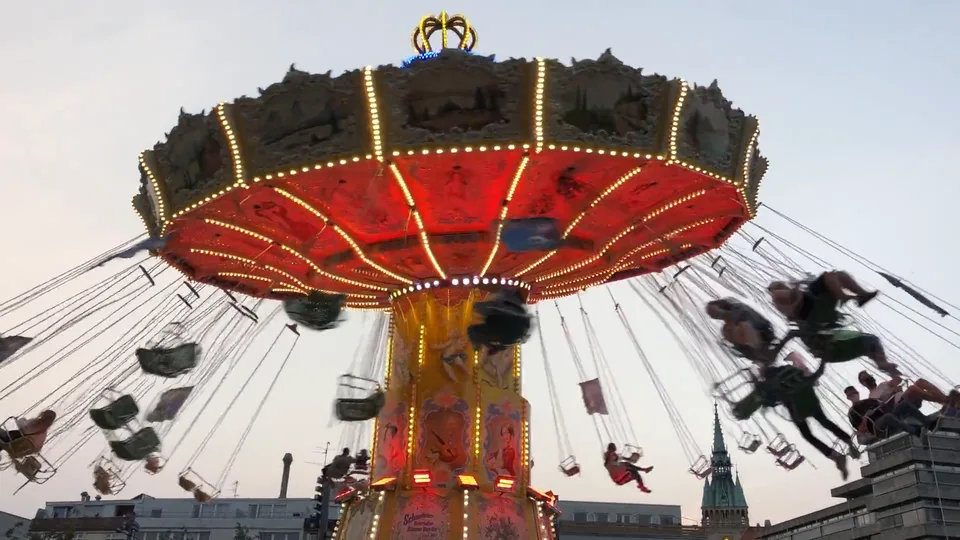
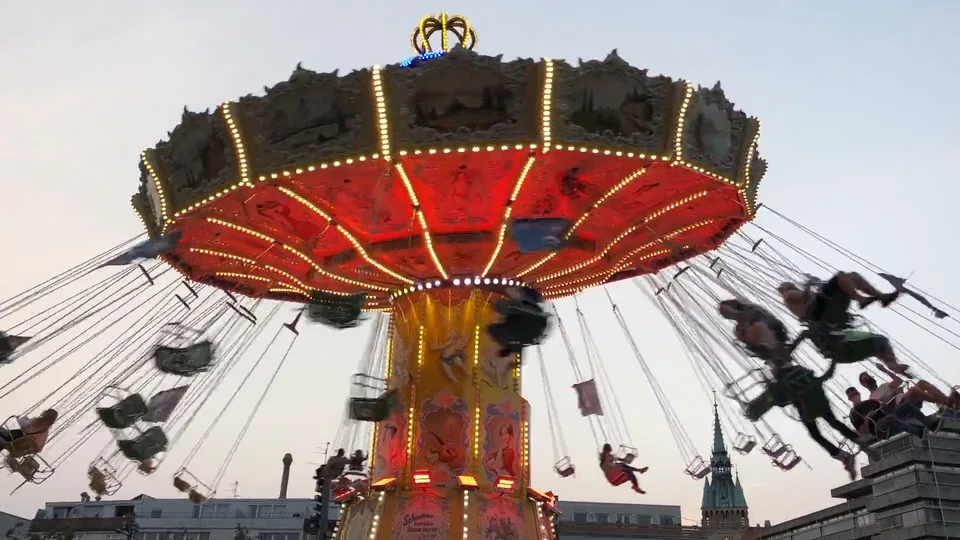
Tested sample: a 30 fps swing ride 4 times slower. On the left each frame is held 4 times and the riders jump; on the right the AI drew 3 new frames between every two and they glide.
or drop a video here · MP4, MOV, WebM up to 1080p and 60 fps
Free · never uploaded · no watermark
Why AI slow motion looks smooth
Slowing a video down in an editor only shows each frame for longer, so a 30 fps clip at 4× slower plays at 7.5 different pictures a second and jumps. AI slow motion fills the gaps with new frames.
- 2× slower
- One new frame between every two. A 30 fps clip plays half as fast and still shows 30 frames a second.
- 4× slower
- Three new frames between every two, the usual slow motion for sport, pets and splashes.
- 8× slower
- Seven new frames between every two, for a dramatic moment of a second or two.
- 60 fps videos
- A 60 fps clip starts with twice the frames, so its slow motion is the smoothest. It plays back at 60 fps.
- Cuts between shots
- When the picture jumps to a new shot, the tool holds the last frame instead of blending two shots together.
Tested 20 Nov 2026 on 9 real 24 and 30 fps videos (phone pans, a night market, a party, neon signs, a cat): we kept every fourth frame, rebuilt the three in between, and compared them with the real ones. The AI frames were about 2.5 times closer to the real ones than holding each frame (LPIPS 0.046 against 0.114) and twice as close as blending the two neighbours (0.099). The model is RIFE 4.22 lite, an open source video frame interpolation network, the same one as our 60 fps converter.
How long it takes
The AI draws 1, 3 or 7 new frames for every frame of your video, so the time grows with the speed you pick, the resolution and the length.
- about 1 min5 seconds of 720p, 4× slower
- about 2 min5 seconds of 1080p, 4× slower
- about 2.5 min5 seconds of 720p, 8× slower
- 2 secondspreviewed first, with the time for your whole video
Measured end to end in Chrome on an Apple M2 Max, 20 Nov 2026, on 3 second 30 fps clips with reading and saving included: at 720p, 12 seconds for 2× slower, 37 seconds for 4× and 1 min 34 s for 8×; at 1080p, 1 min 8 s for 4×. The first run also downloads the AI engine (about 48 MB, once). The tool measures your own computer on the preview and shows the time for your whole video before you start.
How to make a slow motion video
- Trim the moment first Slow motion makes a video 2, 4 or 8 times longer, so cut out the few seconds you want in your phone's Photos app or editor.
- Choose the video MP4, MOV or WebM up to 1080p and 60 fps. It stays on your computer; nothing is uploaded.
- Pick 2×, 4× or 8× and preview The tool makes the first 2 seconds, shows them next to the original and tells you how long the whole video takes on your computer.
- Make it and download Keep the tab open while it runs, then download the MP4 and add music in your editor.
More ways to fix motion and quality
- Free 60 fps converter: turn 30 fps video into 60 fps with AIMake a 30 fps video play at 60 fps, at the same speed and with the sound.
- Upscale video to 1080p without uploading itMake a small clip Full HD before you slow it down.
- Free video stabilizer: stabilize shaky video in your browserSteady a shaky handheld clip first, free in your browser.
Questions about slow motion videos
How can I make a smooth slow motion video for free?
Open this page on a computer in recent Chrome or Edge, choose the video, pick 2×, 4× or 8× and press Preview, then make the whole video and download the MP4. The AI runs in your browser, with no upload, signup or watermark.
What is the difference between slowing a video down and AI slow motion?
Slowing down shows each frame for longer, so motion stutters. AI slow motion works out how everything moved between two frames and draws the moments in between, so the slow motion keeps a full frame rate.
Should I pick 2×, 4× or 8×?
4× suits most clips, such as a jump, a splash or a pet running. 2× is a gentle slow-down that keeps the clip short, and 8× is for one dramatic second. 8× takes the longest to make, since the AI draws 7 frames for every one in your video.
Does the slow motion video keep the sound?
The slow motion video is silent, the way slow motion is usually used. Add music or the original sound in your editor.
Can I slow down only part of a video?
Trim that part first in your phone's Photos app or any editor, then drop the short clip here. The tool slows down the whole clip you give it.
Is my video uploaded?
No. The video is read, slowed down and saved inside your browser tab, using your own graphics card through WebGPU.
Can I make slow motion on my iPhone?
Make it on a computer. The AI needs more graphics memory than iPhone and iPad browsers give a web page, so on an iPhone the page offers to send you its link. On a computer in Chrome or Edge it is free, with nothing to install, and the video stays on that computer.