Enhance video quality for free with AI, right in your browser
An AI video quality enhancer that runs on your own graphics card. Small and soft clips come back sharp, and your video never leaves your computer.
Free · never uploaded · any length
What makes a video look low quality, and how to improve it
Pause on a frame that bothers you and match it to one of these. Each one has a tested fix on ToHD.
- Small, low resolution video
- 360p and 480p clips look smeared once they fill a screen. AI enhance in the tool above enlarges them to 720p, 1080p or 4K and draws edges, eyes and text again, which a normal resize can't do.
- Soft or slightly out of focus
- Every edge looks a little fuzzy. The same AI sharpens it while it enlarges; unblur video shows tested before and after frames.
- Old tapes and early phone videos
- VHS, camcorder and first phone videos come back at 1080p with faces and detail rebuilt, with old video restoration in the cloud.
- Already Full HD
- Take 1080p video to 4K for crisper edges on big screens: free in your browser on a computer, or in minutes in the cloud.
- Choppy, stuttering motion
- 24 and 30 fps clips can step instead of glide. AI frame interpolation draws a new frame between every two and makes them 48 or 60 fps.
- Noisy sound
- Wind, traffic or fan noise behind a voice? Remove background noise in your browser and keep the picture as it is.
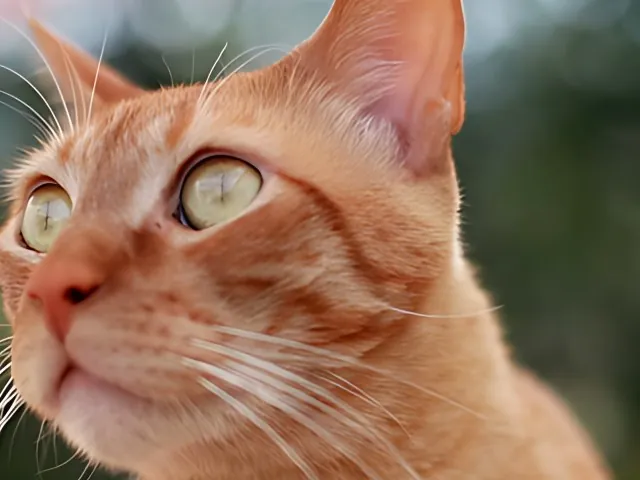
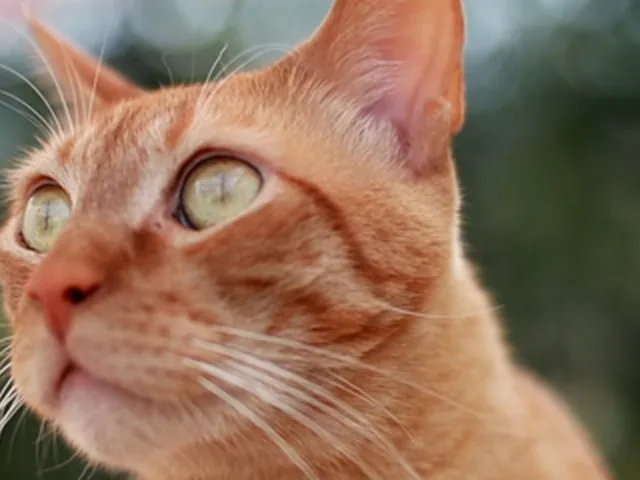
The sample above is a frame from a 1440p stock clip of a cat, scaled down to 360p and enhanced back to 720p with AI enhance, from our 8 Nov 2026 test on four clips (a face, neon signs, a cat, a party).
How to improve video quality in your browser
- Drop the original file MP4, MOV, WebM and MKV from phones and cameras open right in the tool. Use the file from your phone or camera if you have it, because messaging apps shrink and recompress videos.
- Choose the size 2x doubles width and height, 1080p gives Full HD in the shape of your video, and 4K is for big screens.
- Check three frames first The tool enhances three frames from across your clip, shows them next to the original and tells you how long the whole video will take on your computer.
- Save the enhanced MP4 Start the full run and download the result, with the original sound and no watermark.
Free in your browser or fast in the cloud
Both use the same AI model, so the picture is the same.
- Free in your browser
- No signup, no watermark and no length limit. The video stays on your computer. A 30 second 360p clip takes about 3 minutes on a recent Mac.
- Cloud from $5
- For phones, batches and 4K in minutes. One minute of 480p reaches 1080p in about 40 seconds. See packs.
More ways to make video HD
- Upscale video to 1080p without uploading itTurn 720p, 480p or 360p into Full HD, with measured times for each.
- Unblur video free: sharpen soft or out of focus clipsFor clips that are slightly out of focus rather than just small.
- Restore old video from VHS tapes, camcorders and early phonesVHS, camcorder and early phone video rebuilt at 1080p in the cloud.
Fixes for a specific video
- Why videos get blurry on chat apps and social media, and how to keep them sharpWhat WhatsApp, Telegram, iMessage, Instagram, TikTok and YouTube do to video.
- Make a blurry WhatsApp video clearerVideos that came through WhatsApp blurry.
- Fix blurry Instagram Reels and storiesReels and stories that look blurry after posting.
- Fix blurry TikTok videos before you postTikToks that lose quality on upload.
- Upscale your video to 4K before you upload it to YouTubeUpload 1080p as 4K for a sharper YouTube video.
- Upscale AI-generated video to 1080p or 4KVeo, Runway, Midjourney and Kling clips to 4K.
- Why your phone video looks blurry even in 1080p, and what helpsA 1080p phone video that still looks blurry.
- Fix a video that downloaded or saved in low qualityA saved or downloaded clip that came out small.
- Upscale video when your computer has no powerful graphics cardA computer without a powerful graphics card.
- Enhance video quality on your iPhone, without an appOn an iPhone, without an app.
- Enhance video quality on your Android phone, without an appOn an Android phone, without an app.
- A free AI video upscaler for Mac that runs in your browserOn a Mac's own GPU, without an install.
- A free alternative to Topaz Video AI for upscaling videoA free alternative to Topaz Video AI.
Questions about enhancing video quality
How can I enhance video quality for free?
Drop your clip in the tool above, keep AI enhance on and pick 2x, 1080p or 4K. It runs in your browser with no signup, no watermark and no length limit.
Can AI really improve video quality?
Yes. An AI video enhancer helps most on small and soft videos. In our tests on 360p and 480p clips, AI enhance brought back eyes, whiskers, hair and readable text that a normal resize leaves blurry.
What is the difference between a video enhancer and a video upscaler?
Here they are one step. Most low quality video is low resolution, so the same AI model enlarges and sharpens every frame at once.
Can I improve the quality of a 1080p video?
Take it to 4K. Edges get crisper on big screens and TVs. On a computer the free tool makes 4K in your browser; on a phone, or in minutes, 4K runs in the cloud.
Can I enhance video quality on my phone?
Yes. The tool runs in mobile browsers and makes up to 1080p on a phone. For 4K or long videos, the cloud does the work while your phone waits.
Does enhancing video quality here upload my video?
No. The free tool reads, enhances and saves the video inside your browser tab. Nothing is sent to a server unless you choose the cloud.