Upscale old camcorder video from Hi8, MiniDV and Video8 tapes
Upscale camcorder video from family tapes of the 1980s to the 2000s. Drop the captured file and it comes back deinterlaced and sharp at 1080p, with the original sound.
2 credits per second of video, at least 20 per video. Credit packs from $5. The video uploads only when you start it in the cloud.
The upload is deleted as soon as the job ends, and the result stays downloadable for 7 to 30 days, depending on your pack. We never use your videos to train models. Refund policy
Watch old videos come back sharp
Each clip is a real old recording restored in our cloud. Drag the line to compare.


A graduation filmed on a family camcorder. Faces, hair and hands come back sharp and still look like the same people.
Will this fix your camcorder tape?
- Best for
- Hi8, Video8, MiniDV and Digital8 captures up to 576p, interlaced or not.
- On a computer
- Drop the file from your capture folder. Nothing uploads until you start it in the cloud, and we email you when it is done.
- On a phone
- Restoration runs in the cloud, so a phone works too: pick the file from your gallery or Files and start it. The phone only uploads it.
- Newer HD camcorder?
- Files at 720p or above get more from the free AI upscaler or 4K.
Camcorder formats and what you get back
Every tape camcorder format records standard definition video, the size old video restoration is made for.
- Hi8 and Video8
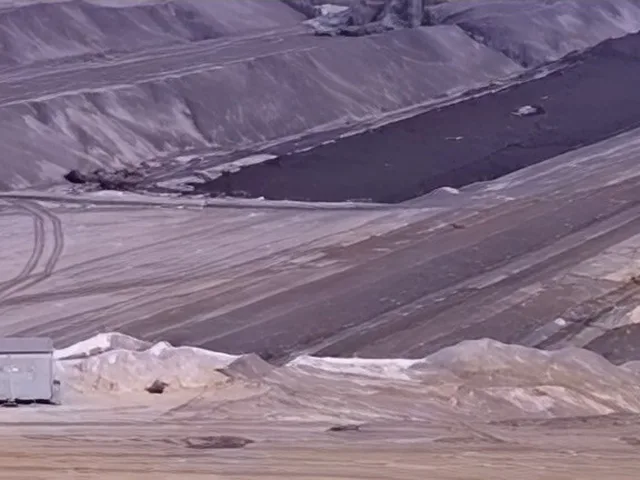
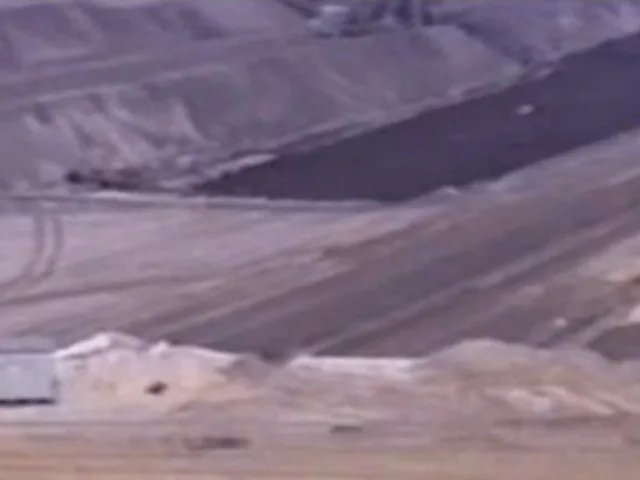
- Analog 8 mm tapes, captured at 480p (NTSC) or 576p (PAL). In our test a 1990 Hi8 pan got the texture of the ground, tracks and machines back, steady from frame to frame.
- MiniDV and Digital8
- Digital tapes stored at 720 × 480 or 720 × 576, interlaced. Widescreen DV that squeezes 16:9 into that frame comes out at 1920 × 1080, with the right shape.
- VHS-C and S-VHS
- The same signal as VHS in a smaller cassette. See VHS to HD for tips on capturing it.
- Date and time stamps
- The camcorder date burned into the corner stays readable and keeps the right digits.
The sample above is a 1990 Hi8 camcorder pan of an open-pit mine (source by Maximilian Schönherr, CC BY-SA 4.0; the restored frame is shared under the same licence), enlarged with a normal resize on the left and restored in our cloud on the right, from our 14 Nov 2026 test. A 2001 family camcorder graduation in the same test kept faces, hair and hands recognisable.
How to upscale camcorder footage
- Get the tape onto your computer MiniDV and Digital8 copy over FireWire or through a transfer service; Hi8 and Video8 play into a USB capture device. Save the file as MP4, MOV or WebM.
- Drop it here The tool checks the size and length and shows the credits and the time before you upload anything.
- Restore it in the cloud The tape is deinterlaced, restored at its own frame rate and comes back at 1080p. 4:3 tapes become 1440 × 1080.
- Download the MP4 The original sound is kept. Tick Also remove background noise to quiet wind and handling noise at no extra credits.
What restoring a camcorder tape costs
You see both before you start, and credits never expire.
- 2 creditsper second of video, at least 20 per video
- about 10 minof processing per minute of tape
- 1080poutput from tapes up to 576p
- $5300 credits, 2.5 minutes of tape
More old video
- VHS to HD: make your digitized tapes sharp at 1080pFull-size VHS tapes, with capture tips.
- Wedding video enhancer: improve an old or blurry wedding videoWedding videos on tape, DVD or an older camera.
- Restore old video from VHS tapes, camcorders and early phonesHow restoration works, with sample videos to compare.
Questions about upscaling camcorder video
Can I upscale MiniDV footage to 1080p?
Yes. MiniDV is 720 × 480 or 720 × 576 and interlaced. Drop the file here and it is deinterlaced and restored to 1080p in the cloud, with widescreen DV kept at 16:9.
How do I make Hi8 tapes look better?
Capture the tape at its own size into an MP4 or MOV file, then restore it here. In our test on a 1990 Hi8 tape, smeared ground and machines got their texture back at 1080p.
Should I upscale to 4K instead?
For tapes, 1080p is the size restoration makes and it already fills a TV well. If you want a 4K file, run the restored 1080p video through the 4K upscaler afterwards.
What does it cost?
2 credits per second of video, at least 20 per video. A 10 minute tape uses 1,200 credits. Credit packs start at $5 for 300 credits.
What happens to my family videos?
The file is uploaded to our storage, restored on our GPUs and deleted as soon as it is done. The result stays downloadable for 7 to 30 days depending on your pack, and we never use your videos to train models.