Enlarge wedding photos for printing
Ask for the full-resolution export first. If that is unavailable, check the pixels remaining after cropping, try an enlarged copy, and inspect faces before ordering a small test print.
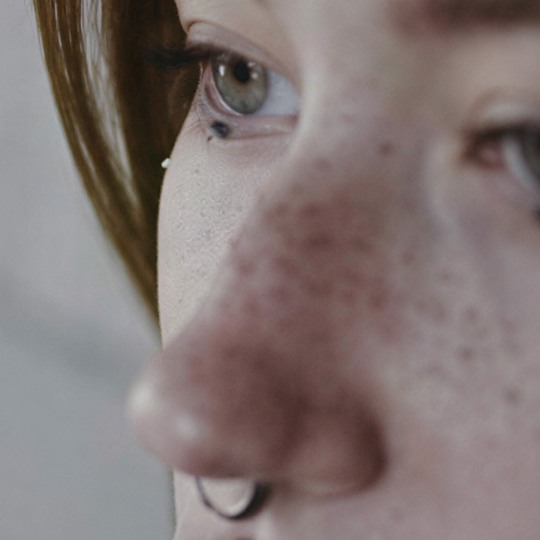
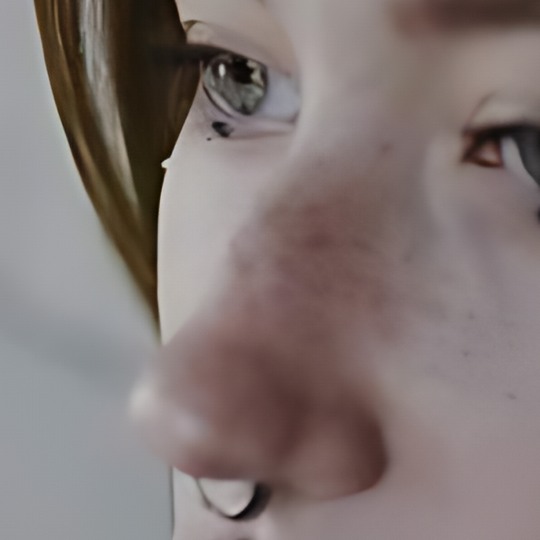
Look at the skin texture and eyelashes. Clearer-looking texture may include generated detail.
Portrait: cottonbro studio / Pexels, downsampled test image. Example credits
or drop it here
JPEG, PNG or WebP
Free · No signup · No watermark
Examples use 4×. Choose your output after selecting a file.
Bigger doesn’t always mean better. Photo enhancement can change fine details. For text or logos, check the result carefully.
Before ordering a larger wedding print
- Ask for the full-size export
- Check the photographer’s gallery for an original-size download. Ask for the full-resolution edited file if you only received a web copy. Re-exporting the original is preferable to trying to rebuild missing detail.
- Check pixels, not megabytes
- A small file can still have enough pixels, and a large file can still be soft. Read its width and height, then inspect important faces. File size depends on image content and compression as well as dimensions.
- Work with a copy
- Keep the original. The tool accepts still JPEG, PNG and WebP. HEIC and RAW files need a supported export first; do not reduce the pixel dimensions when making that copy.
An 8 × 10 print: a worked pixel check
Ask your print provider what pixel density and file format it wants. At an example target of 300 pixels per inch, an 8 × 10 inch print uses 2400 × 3000 pixels. If your selected crop is 1200 × 1500, 2× gives that output size. If it is already 2400 × 3000 and sharp, enlargement may not be needed. Changing a resolution label from 72 to 300 without resampling does not add pixels. The Adobe explanation of image size and resampling describes the distinction. Your printer’s requirement takes precedence over this example.
Leave room for the crop
An 8 × 10 print is 4:5; many camera photos are 3:2. Filling the frame can cut off people at the sides. Choose the crop in an editor first, or ask the print provider to fit the whole image with borders. Calculate with the pixels left after cropping. ToHD enlarges the existing frame; it does not extend the photograph or recover a person outside the crop.
Prepare and compare an enlarged copy
- Choose the right source Use the photographer’s best export, not a messaging thumbnail or a screenshot. If the only copy is heavily compressed, expect limits.
- Try free enlargement Use 2× or 4× on your device in the tool above. Compare the output with the original at the same display size. More pixels do not by themselves prove that a photo is more faithful.
- Inspect every important face Check eyes, teeth, hair, glasses, jewellery and clothing patterns. AI can invent or alter small details. The optional cloud photo model may produce a different appearance; do not assume it preserves identity better.
- Ask for a proof Before ordering a large framed print, inspect a small proof or a section printed at the intended final scale. Screen brightness and print materials change how a result looks. Keep the unprocessed file available.
What enlargement does not promise
- Exact faces
- The tool is not an identity-preserving restoration service. If a result looks unlike the person, reject it even if it looks sharper.
- Print-ready colour
- Downloads are sRGB PNGs without the source EXIF metadata. They are not a guarantee of paper colour, a CMYK conversion or a finished print PDF. Check the provider’s requirements.
- A cure for every warning
- An upload warning can be caused by the chosen crop, the uploaded version or a format issue. If the file already has adequate pixels, investigate that before enlarging it.
Questions before printing wedding photos
Does changing 72 DPI to 300 DPI add detail?
Changing resolution metadata without resampling does not create new pixels. Check pixel dimensions and the intended print size.
Is a small file size proof that my photo is low resolution?
No. File size also depends on compression and image content; check pixels and visible detail.
Why is an 8×10 print cropping my photo?
An 8×10 frame has a 4:5 ratio. A differently shaped photo must be cropped or fitted with borders.
Will AI keep everyone’s face exactly the same?
No. AI can change facial details. Compare every important face with the original before printing.
Can I upload an iPhone HEIC photo?
HEIC is not supported directly. Obtain a JPEG, PNG or WebP copy without unnecessarily reducing its pixel dimensions.